iPhone Duo App Store Screenshots: Apple’s April 2027 Requirement
Apple’s October 5, 2026 announcement opens submissions for iPhone Duo optimized apps and sets a future screenshot requirement: submitted apps and games will need Duo screenshots starting April 2027. We checked the official sources on October 8, fixed a source-cropping issue in our generator, and then captured Foldmetry on the native Duo simulator with Xcode 27.1 RC.
What changed, and when?
The announcement connects Xcode 27.1 development support, Device Hub testing, updated media specifications, and App Store Connect product-page previews. April 2027 is the stated requirement month; Apple has not specified a day in that announcement.
Apple’s screenshot specifications further identify apps using the iOS 27.1 SDK or later as subject to this requirement from April 2027. Check that page alongside the announcement and your actual SDK when planning a submission.
Read the October 5 announcement ↗Screenshot requirement and SDK scope ↗
| Date | Developer action |
|---|---|
| October 5, 2026 | Duo optimized submissions open |
| October 23, 2026 | iPhone Duo reaches customers |
| April 2027 | Submitted apps and games need Duo screenshots |
Can I build and submit with Xcode 27.1 RC?
Yes. As checked on October 8, the available build is Xcode 27.1 RC (27A9275), released on October 5. RC means release candidate. Apple’s October 5 App Store Connect release notes explicitly permit apps built with this RC and the iOS 27.1 SDK for the App Store and internal or external TestFlight testing. You can use this accepted RC for your submission.
Get the RC from Apple’s developer downloads, linked from its release entry. Run the app in the iPhone Duo simulator supplied with Xcode 27.1 and test display changes, poses, and supported orientations before capturing the actual UI. Apple’s preparation guide identifies the Duo simulator as the best way to test the full native experience.
Xcode 27.1 RC release and downloads ↗Apple accepts RC builds for App Store and TestFlight ↗Apple upload workflow ↗Apple Duo simulator guidance ↗
- Install Xcode 27.1 RC alongside your current Xcode and select its Duo simulator.
- Verify the app, then capture each display, supported orientation, and language you need.
- Import those captures into App Asset Kit to compose and export the store PNGs.
- Archive the app with the RC and upload through Xcode’s distribution flow; select the processed build in App Store Connect for your submission.
Use the screenshot dimensions for the actual display
The four accepted pixel pairs are below. Apple allows 1–10 screenshots per device size in JPEG, JPG, or PNG, without alpha channels or transparency. Preview videos have separate specifications. The announcement does not say that every app must supply all four screenshot variants. Keep distinct source sets where your app’s UI differs.
Apple screenshot specifications ↗
| Display | Portrait | Landscape |
|---|---|---|
| Outer | 1398 × 2034 | 2034 × 1398 |
| Inner | 2007 × 2853 | 2853 × 2007 |
Adapt the app before capturing the app
Apple’s preparation guide distinguishes SDK behavior: older builds leave unused display space; iOS 27 improves resizing; iOS 27.1 lets the app use the full display and places system bars vertically. Before shipping, review sizing based on the main screen, orientation, device identity, and full-bleed media. Test the available space as it changes.
For your own release check, choose one repeatable task. Open, close, and rotate the device with a recognizable selection or in-progress exercise. Check navigation, controls, and state before taking the final screenshots. A resized image cannot demonstrate these behaviors.
Our first Foldmetry test: correct pixels can still hide cropped UI
We first used three real Foldmetry 1.4 iPhone captures in English and Simplified Chinese as a stress test: the home screen, cube-folding exercise, and progress. We rendered both Duo sizes in both orientations, producing 24 PNGs. Their dimensions, RGB encoding, and absence of alpha passed file checks.
The first render cropped the conventional iPhone capture to fill a Duo frame. We changed Duo rendering to retain the complete source and added clearer aspect and orientation warnings. The comparison below shows the same source before and after the fix.
That first stage tested the export pipeline with conventional iPhone captures. We kept those samples as a rendering comparison and then captured the app again on the actual Duo simulator for the follow-up below.
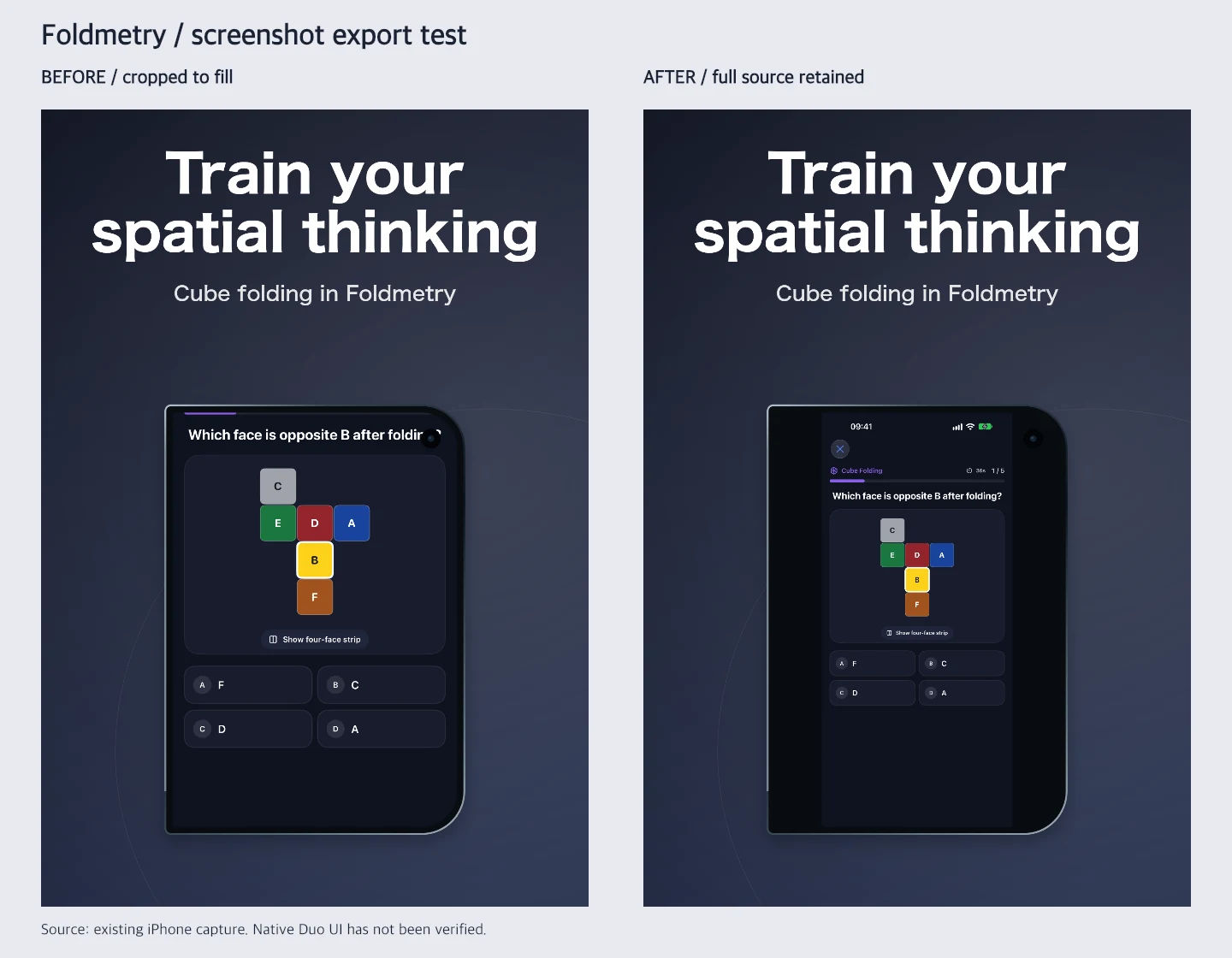
Our follow-up: native Duo captures with Xcode 27.1 RC
We built the current Foldmetry 1.4.1 (Build 7) with Xcode 27.1 RC (27A9275) and ran it on the iPhone Duo simulator with iOS 27.1. We captured home, cube-folding exercise, and progress in English and Simplified Chinese on both displays and in both orientations: 24 genuine native captures. We then generated 24 marketing PNGs with the same App Asset Kit CLI used for the first test.
The simulator’s original PNGs contained an alpha channel. We retained the originals and produced separate RGB copies without resizing the UI. Both the 24 opaque native files and the 24 composed outputs passed exact-dimension and no-alpha checks. Each group contains three images. Inner landscape shows the cube diagram and four answer controls together; the shorter outer landscape viewport places answers below the initial view. Opening, rotating, and closing the device retained the selected progress tab.
This covers those three scenes and basic tab continuity in the simulator. We did not change Foldmetry’s native code or certify every app flow, an in-progress exercise, or physical-device behavior. The single-display files passed local checks. The ASC upload check below uses paired exports; App Review remains pending.
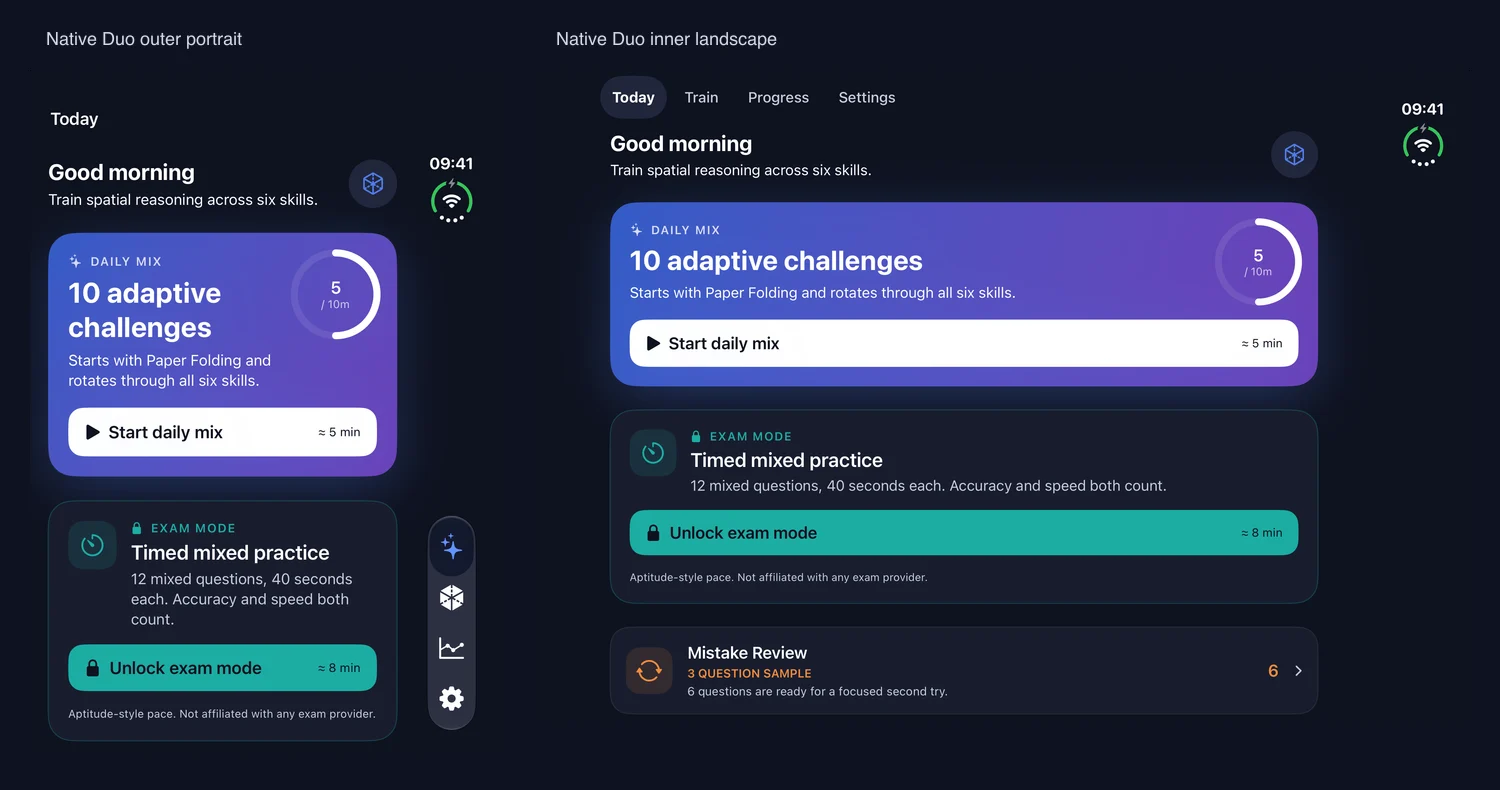
Can one screenshot show folded and unfolded UI together?
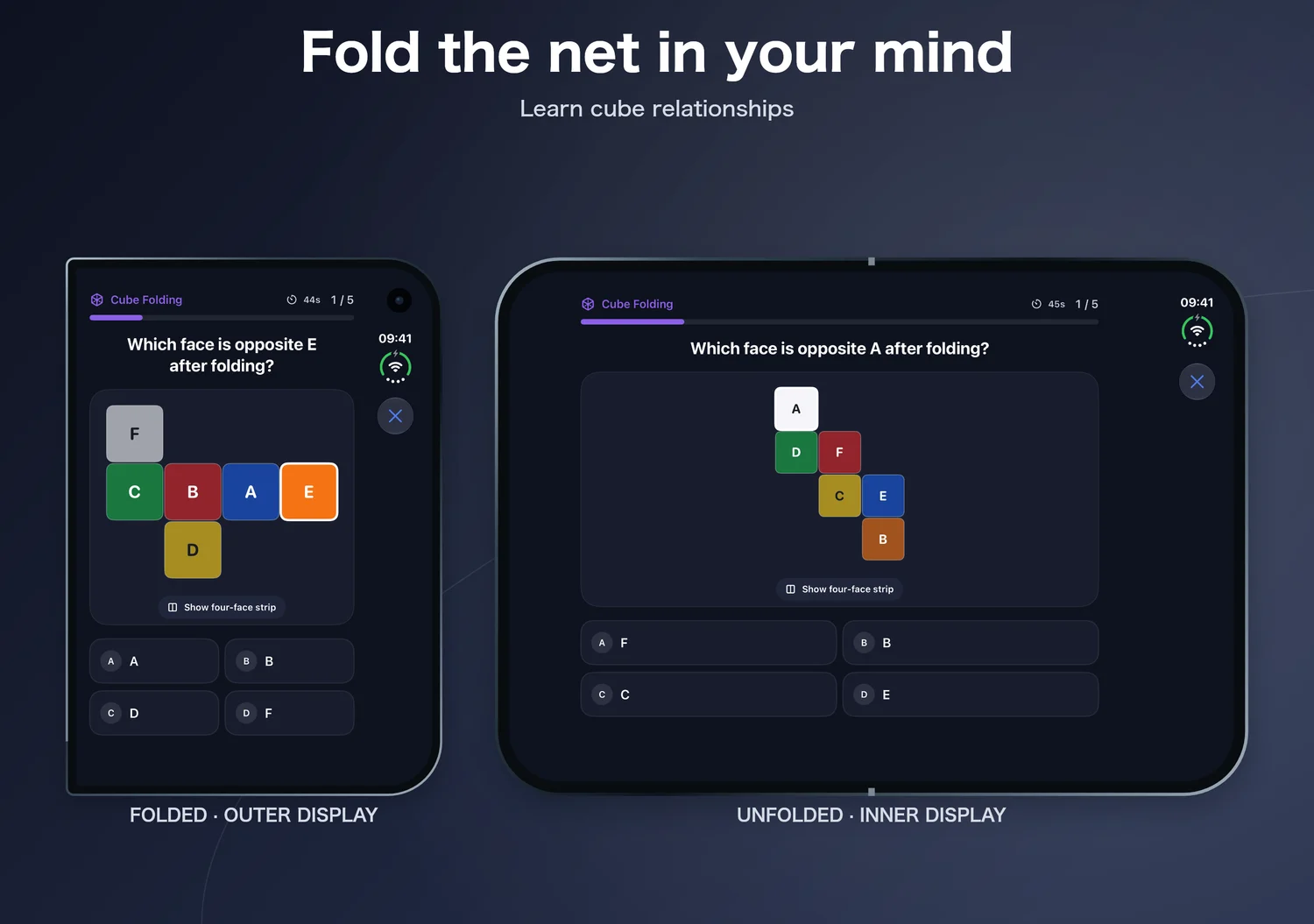
Apple 2.3.3 permits overlays around genuine app UI. It does not separately endorse a Duo two-pose composite. Keep both interfaces readable and treat this as a design interpretation that still needs App Review.
We added a Folded & unfolded template with an explicit outer source and inner source for each scene. Each capture keeps its own orientation, aspect, and display frame. The final canvas remains one of the four accepted pixel pairs; do not upload a file whose width is simply the sum of both originals.
Using the native Foldmetry captures above, we generated 24 more RGB PNGs: two languages, three scenes, and four final canvases. Missing inner sources and swapped display aspects are rejected. Local checks passed. The ASC check below also covers four English home-screen composites. The exercise captures are independent examples of the same feature, not evidence that one question continues across a fold.
Apple screenshot review guidance ↗Accepted screenshot dimensions ↗
ASC upload test: all four Duo sizes processed successfully
On October 9, 2026, we uploaded four English Foldmetry home-screen composites to its App Store Connect Asset Library as screenshots. Each contains the real folded outer and unfolded inner UI. Apple finished processing all four, identified the matching Duo screenshot specification, and returned the exact original pixel dimensions.
All four are in Prepare for Submission. This verifies file-format acceptance for these samples. App Review of the composition and content is a separate step. We added library assets without replacing existing screenshots or changing product-page placements.
Apple Asset Library workflow ↗Official screenshot dimensions ↗
| Display / orientation | Accepted pixels | Processing result |
|---|---|---|
| Outer portrait | 1398 × 2034 | Complete · Prepare for Submission |
| Outer landscape | 2034 × 1398 | Complete · Prepare for Submission |
| Inner portrait | 2007 × 2853 | Complete · Prepare for Submission |
| Inner landscape | 2853 × 2007 | Complete · Prepare for Submission |
Check the screenshot content and its App Store placement
Apple’s updated 2.3.3 guidance requires more than half the screenshots for each supported device to show the app in use. Overlay copy is allowed, but a correct-size image consisting only of title art or a login screen will not establish the product experience. With three screenshots, at least two should show actual use.
Use App Store Connect’s Asset Library to manage screenshots, previews, and creative assets. Review the intended product page in its preview tool. Product-page headers and search-result creatives are separate assets; do not treat them as replacements for screenshots.
Apple screenshot review guidance ↗Manage assets in Asset Library ↗
Make the screenshot package with App Asset Kit
Once you have genuine captures, open our free Duo screenshot generator. Choose the matching display and orientation, prepare up to five scenes, and write one concise benefit for each scene. Review the rail at full size and export a local ZIP of PNGs.
Use each display’s own sources when producing another set. A panorama scene exports two consecutive files, so count finished images before uploading. Save the editable design alongside the raw captures. Our tool handles composition and exact output pixels; application layout work remains in your app project.
- Replace mismatched sources instead of relying on the output filename.
- Check text and important controls in the downloaded files.
- Keep display, orientation, language, and build in your release record.
Frequently asked questions
Are iPhone Duo screenshots mandatory right now?
Apple opened Duo optimized submissions on October 5, 2026. Its announced screenshot requirement starts in April 2027; no specific day is stated.
Can Xcode 27.1 RC builds be submitted to the App Store?
Yes. Apple’s October 5, 2026 App Store Connect release notes explicitly accept apps built with Xcode 27.1 RC and the iOS 27.1 SDK for App Store submission and TestFlight testing.
Can a screenshot combine folded and unfolded UI?
The template supports it. This follows Apple’s general overlay guidance; Apple has not separately guaranteed approval of this Duo composition. Keep genuine UI visible and use one accepted final canvas size.
Does exporting a Duo-size PNG adapt my app?
No. It prepares an image file. Verify the running app and capture genuine display UI before treating the set as submission ready.
Are the Foldmetry examples approved Duo screenshots?
Four English home-screen paired outputs, made from genuine Xcode 27.1 RC Duo captures, completed ASC processing in all four official sizes on October 9. They are waiting for review submission. Content approval remains pending; the earlier comparison uses conventional iPhone captures.